Compliance is getting harder to manage as fintech companies grow. There’s more data to review, more rules to follow, and more pressure to keep everything moving. That’s why teams are starting to look closely at how to automate compliance without creating new risks.
Automation can take repetitive work off your plate and help you keep up with day-to-day requirements. But it also brings new challenges around oversight, data quality, and accountability.
This guide breaks down where automation makes sense, where it doesn’t, and how to approach it in a way that stays aligned with regulatory expectations.
What Does It Mean to Automate Compliance?
When people talk about automating compliance, they’re usually referring to using software to handle tasks that would otherwise be done manually. This can include things like:
Reviewing transactions
Collecting customer information
Generating reports
Instead of relying on spreadsheets, emails, and manual checks, automation allows these processes to run through structured systems. Rules, triggers, and workflows are also set up so that tasks happen consistently and with less manual input.
That said, automation doesn’t mean removing humans from the process. It’s about shifting how work gets done. Systems handle repetitive tasks, while compliance teams focus on reviewing exceptions, making decisions, and managing risk.
Learn more about compliance automation →
Benefits of Automating Compliance
Automation changes how compliance teams operate day-to-day. When set up correctly, it can make processes more reliable, easier to manage, and better suited for growth.
Here are some of the main benefits:
Reduces manual workload: Automation takes repetitive tasks off your team’s plate, like data entry, basic reviews, and routine checks. This gives your team more time to focus on risk analysis and decision-making.
Improves consistency across processes: When rules are built into a system, they’re applied the same way every time. This helps reduce gaps, missed steps, and inconsistencies between reviewers.
Speeds up key workflows: Tasks like onboarding, transaction reviews, and reporting move faster when they’re not dependent on manual handoffs or follow-ups.
Creates stronger audit trails: Automated systems log actions as they happen. You can track decisions, changes, and reviews in a structured way, which helps during audits and regulatory exams.
Improves visibility into compliance activity: With centralized systems, it’s easier to see what’s happening across your program. You can track open items, monitor trends, and identify issues earlier.
Supports scaling without linear hiring: As volumes grow, automated workflows can handle more activity without requiring the same increase in headcount. This is especially important for fast-growing fintech teams.
Reduces operational risk from human error: Manual processes can break down under pressure. Automation helps reduce the risk of missed reviews, incorrect data entry, or inconsistent application of rules.
How to Automate Compliance Without Increasing Regulatory Risk
Automation can help reduce workload, but it needs to be handled carefully. Focus on building systems that support your compliance program without weakening oversight or control.
Here are the key principles to follow:
Be selective about what you automate: Start with processes that are repetitive, rules-based, and high volume. These are easier to structure and less likely to introduce risk when automated.
Keep human oversight in place: Not everything should run on autopilot. Reviews, exceptions, and complex decisions still need human judgment. Automation should support your team, not replace it.
Use clean and structured data: Automated systems depend on the quality of your data. If inputs are inconsistent or incomplete, the outputs won’t be reliable. Spend time organizing your data sources before scaling automation.
Define clear rules and logic: Every automated workflow should follow documented rules. You should know how decisions are made, what triggers actions, and what happens when conditions change.
Build in escalation paths: When something doesn’t fit expected patterns, the system should flag it and route it for review. This helps prevent issues from being missed or handled incorrectly.
Document everything: You need a clear record of how your systems operate. This includes workflows, rules, and decision logic. It helps your team stay aligned and supports you during audits or exams.
Test before scaling: Roll out automation in stages. Test workflows, review outputs, and make adjustments before applying them across your entire program.
What Compliance Processes Can Be Automated?
Not every part of compliance should be automated, but many day-to-day tasks can be handled by systems. The key is to focus on areas that follow clear rules and require consistent execution.
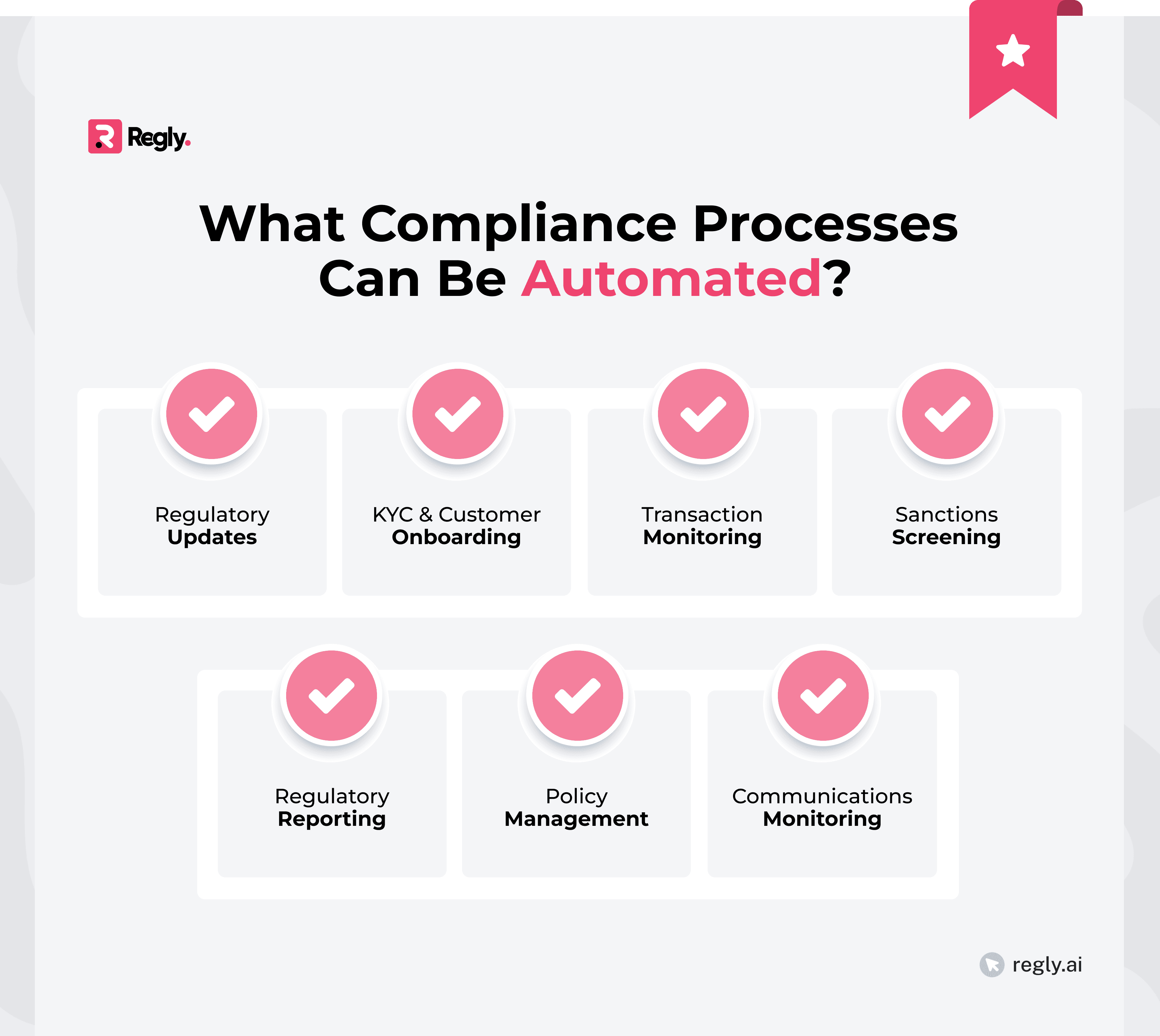
Regulatory Update Monitoring
Keeping up with regulatory changes is time-consuming, especially for fintech teams operating across multiple jurisdictions. Rules change, guidance gets updated, and missing something can create downstream risk.
Automated systems can track updates from regulators, flag relevant changes, and route them to the right people for review. Instead of manually checking multiple sources, your team gets a more structured feed of what’s changed.
Automation can also help with tracking impact. For example, when a rule changes, the system can link it to affected policies, controls, or workflows. This makes it easier to assess what needs to be updated and avoid gaps.
Use Regly’s regulatory update tool to track rule changes and monitor relevant updates in one place →
KYC and Customer Onboarding
KYC and customer onboarding often involve a large amount of repetitive compliance work, such as:
Collecting information
Verifying identities
Running checks against watchlists or risk criteria
Automation can streamline how this data is collected and validated. Instead of relying on manual reviews, systems can pull data from trusted sources, run identity checks, and flag missing or inconsistent information right away. This helps reduce back-and-forth and speeds up the onboarding process.
It can also support risk-based workflows. For example, lower-risk customers can move through faster, while higher-risk profiles are flagged for additional review. This keeps the process efficient without treating every case the same.
Transaction Monitoring and AML Workflows
Transaction monitoring is a core part of most compliance programs, especially for fintechs handling payments, trading, or crypto activity. It involves reviewing transactions to identify patterns that could indicate suspicious behavior.
Automation can handle a large part of this process. Systems can:
Apply predefined rules to transaction data
Flag unusual activity
Generate alerts based on thresholds or patterns
This then helps teams focus on reviewing alerts instead of scanning raw data.
It also supports case management. Once an alert is triggered, workflows can route it to the right reviewer, track investigation steps, and log decisions. This creates a more structured process compared to managing alerts through emails or spreadsheets.
Learn more about how transaction monitoring works →
Sanctions Screening
Sanctions screening is another area where automation plays a key role. Firms need to check customers and transactions against sanctions lists, which are updated regularly and can be large and complex.
Automation makes this process manageable. Tools like Regly’s AML screening tool can:
Screen names against multiple lists
Flag potential matches
Update checks as lists change
Teams won’t have to do as many manual searches and will stay current.
Regulatory Reporting and Audit Trails
Regulatory reporting often involves pulling data from different systems, formatting it, and submitting it on a set schedule. Doing this manually can be time-consuming and can introduce errors.
Automation simplifies this process. Systems can:
Collect the required data
Apply the correct formats
Generate reports based on predefined templates
The result is reduced manual effort and consistent reporting.
It also improves audit readiness. Every action, update, and submission can be logged automatically, creating a clear audit trail of what was done and when. This makes it easier to respond to regulatory requests or audits without scrambling to piece together information.
Policy Management and Attestations
Managing policies is an ongoing task. Documents need to be updated, shared with the right teams, and acknowledged on a regular basis. When this is handled manually, it’s easy to lose track of versions or miss attestations.
Automation helps bring structure to this process. Systems can:
Store policies in one place
Track version history
Notify employees when updates require review or sign-off
It also makes it easier to show evidence. You can see who reviewed a policy, when they did it, and which version they acknowledged. This becomes important during audits or internal reviews.
Read our guide to policy management guide for fintech compliance teams →
Communications Monitoring and Supervision
Many regulated firms are required to monitor employee communications, especially in broker-dealer and trading environments. This includes emails, chats, and other business-related messages.
Automation can help scan large volumes of communication for specific keywords, patterns, or risk indicators. Instead of reviewing everything manually, systems can flag messages that need attention and route them for review.
It also helps with supervision workflows. Alerts can be assigned, tracked, and documented, so there’s a clear record of what was reviewed and how issues were handled.
What Should Not Be Fully Automated
Automation can help with many parts of compliance, but other areas of compliance still require judgment, context, and accountability, and should never be fully handed over to systems.
Risk assessments: Assessing risk involves more than applying a fixed set of rules. It requires understanding your business model, customer base, and evolving threats. Automation can support data collection and scoring, but the final assessment should involve human review.
Escalations and SAR decisions: Deciding whether to escalate an issue or file a Suspicious Activity Report involves careful judgment. These decisions often depend on context that systems can’t fully interpret. Automation can help surface alerts, but the decision itself should stay with experienced compliance professionals.
Regulatory interpretation: Rules aren’t always black and white. Interpreting regulatory requirements and applying them to your specific business requires expertise. Automation can assist with tracking and mapping rules, but it can’t replace legal or compliance judgment.
Board and senior management oversight: Oversight responsibilities sit with leadership. This includes reviewing compliance reports, setting risk appetite, and making strategic decisions. Systems can support reporting, but accountability remains with people.
Key Regulatory Requirements That Shape Compliance Automation
Compliance automation doesn’t happen in isolation. How you design your systems should be shaped by regulatory requirements, which define what needs to be monitored, documented, and reported.
AML/CFT Program Requirements
Under the Bank Secrecy Act and FinCEN guidance, firms are expected to monitor transactions, identify suspicious activity, and maintain clear records.
Automation is commonly used to support these obligations.
Area | Automation Example |
|---|---|
Transaction monitoring | Alerts for unusual activity |
Customer risk scoring | Automated risk levels |
Suspicious activity review | Case workflows and tracking |
Recordkeeping | Audit logs and data storage |
Data aggregation support |
At the same time, regulators expect firms to stay accountable for how these systems operate. You should be able to explain how the firm generates alerts, sets thresholds, and handles reviews.
Sanctions Compliance
Sanctions rules require firms to screen customers and transactions against lists published by OFAC and other authorities. These lists change frequently, and missing an update can create serious exposure.
Automation helps manage this at scale. Systems can:
Run real-time screenings
Update lists automatically
Flag potential matches as they appear
It also supports ongoing monitoring. Existing customers can be re-screened when lists change, rather than waiting for periodic reviews.
Broker-Dealer Supervision
Broker-dealers are required to supervise their activities on an ongoing basis. This includes:
Monitoring trades
Reviewing communications
Maintaining a written supervisory procedure
Automation can support supervision by flagging unusual activity, tracking reviews, and assigning tasks to the right team members. For example, systems can detect trading patterns that fall outside expected ranges or highlight communications that need review.
It also helps with documentation. Supervisory actions, reviews, and follow-ups can be logged automatically, making it easier to demonstrate how supervision is carried out.
Consumer Protection
Consumer protection rules focus on how firms treat customers. This includes fair lending, clear disclosures, and avoiding practices that could be considered unfair or misleading.
Automation can help monitor customer interactions, review communications, and flag patterns that may raise concerns. For example, systems can track how:
Products are offered
Fees are applied
Complaints are handled
It can also support consistency. When rules are built into workflows, customers are more likely to be treated the same way across different channels and teams.
How to Automate Compliance: Step-by-Step Framework
Automating compliance works best when it’s approached in a structured way. Instead of trying to automate everything at once, it helps to break down the process into clear, manageable steps.
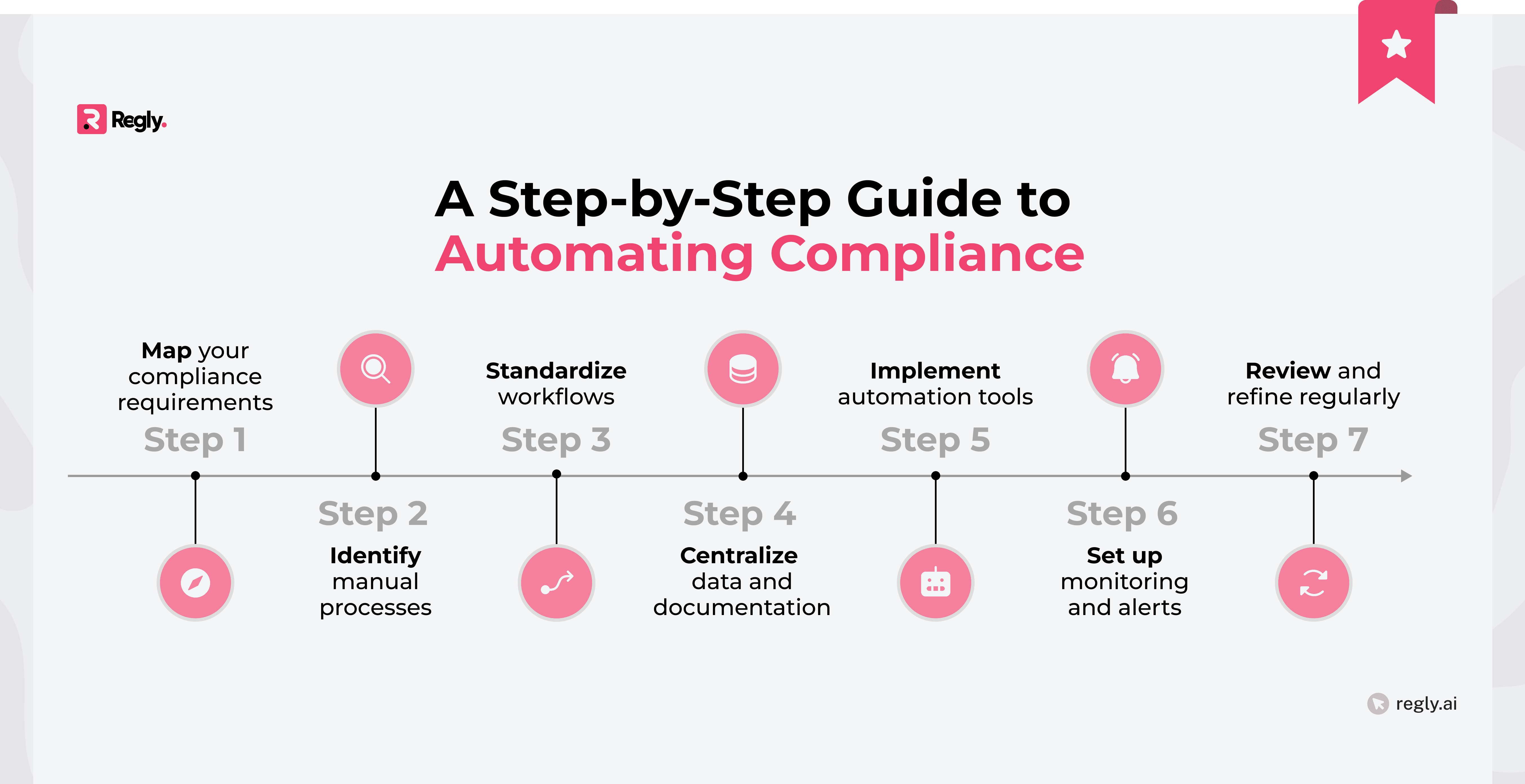
Step 1: Map Regulatory Obligations to Workflows
Start by understanding what you’re actually required to do. This means taking your regulatory obligations and mapping them to specific processes, tasks, and controls inside your business.
For example, if a rule requires transaction monitoring, you should be able to point to:
How transactions are reviewed
Who reviews them
What happens when something is flagged
The same applies to onboarding, reporting, and recordkeeping.
This step gives you a clear view of how compliance is currently handled. It also helps you spot gaps, overlaps, and areas that rely too heavily on manual work. Without this foundation, it’s hard to automate anything in a controlled way.
Step 2: Identify High-Impact Automation Opportunities
Once you’ve mapped your workflows, the next step is to decide where automation will actually help. Not every process needs it, so it’s worth focusing on areas that create the most friction or take up the most time.
Look for tasks that are:
Repetitive
Rules-based
High volume
These are usually good candidates because they follow clear patterns and don’t rely heavily on judgment. Common examples include data collection, screening, and routine monitoring.
It also helps to think about risk. If a process is prone to errors or delays, automation can help bring more consistency. At the same time, avoid rushing into automating complex areas that still need human review.
Step 3: Structure Data and Source Systems
Automation depends on how your data is organized. If information is scattered across tools, spreadsheets, or emails, it’s hard to build reliable workflows on top of it.
Start by identifying where your data lives and how it flows between systems. This includes customer data, transaction data, alerts, and internal records. The goal is to bring structure and consistency so systems can use that data effectively.
It also helps to standardize formats and fields. When data is clean and consistent, automation becomes more reliable and easier to scale. If not, you’ll spend more time fixing issues than benefiting from the system.
Getting this step right makes everything that follows much smoother.
Step 4: Implement Rules, Monitoring, and Triggers
Once your data is structured, you can start building the logic that drives automation. This includes:
Defining rules
Setting thresholds
Deciding what should trigger an action
For example, a transaction above a certain amount might trigger a review, or missing customer information might pause onboarding. These rules should reflect your policies and how your compliance program is designed to operate.
Monitoring also plays a key role here. Systems should continuously track regulatory changes, guidance updates, and new enforcement activity that could impact your compliance program.
This helps teams stay informed without relying on manual searches, scattered newsletters, or periodic checks across multiple sources. It also makes it easier to identify which updates require policy changes, workflow adjustments, or additional review.
Use Regly Monitor to track regulatory updates and stay informed as requirements evolve →
Step 5: Build Escalation and Human Review Layers
Automation should never operate without a way to step in when something doesn’t look right. That’s where escalation and review layers come in.
Set clear rules for when a task or alert needs human attention. This could be based on:
Risk level
Missing data
Unusual patterns
Once triggered, the system should route the item to the right person or team.
It also helps to define how reviews are handled. Who’s responsible, what needs to be checked, and how decisions are recorded. This keeps the process consistent and easier to manage.
These layers act as a safety net. They allow automation to handle volume while keeping control over decisions that require judgment.
Step 6: Create Audit Trails and Evidence
Every automated process should leave a clear record behind. You need to know:
What happened
When it happened
Who was involved
Systems can log actions automatically, such as data changes, alerts generated, reviews completed, and decisions made. Now you have a timeline that’s easy to follow when questions come up.
It also helps during audits and exams. Instead of pulling information from different places, you have a structured record that shows how your compliance program is operating.
Make sure these records are easy to access and tied to the underlying workflows. That way, you’re not just storing data; you’re building evidence that supports your program.
Step 7: Test, Tune, and Continuously Improve
Automation isn’t something you set and forget. It needs regular testing and adjustments as your business, data, and regulatory requirements change.
Start by reviewing how your workflows are performing.
Are alerts accurate?
Are they generating too many false positives?
Are tasks getting stuck or delayed?
These are all signs that something needs to be refined.
It also helps to get feedback from the team using the system. They’ll spot issues that aren’t obvious at the setup stage and can point out where processes feel unclear or inefficient.
As you make changes, document them and track the impact. Over time, this helps you build a more reliable, effective, and adaptable compliance program.
How to Mitigate Regulatory Risk When Automating Compliance
The challenge in compliance automation is balancing efficiency gains and regulatory risk. To avoid issues, you need to build controls around your systems and stay closely involved in how they operate.
1. Maintain Human Oversight and Accountability
Automation can handle tasks, but accountability doesn’t shift to the system. Your team is still responsible for what happens inside your compliance program.
Make it clear who owns each process. When alerts are generated or tasks are completed, someone should be responsible for reviewing and signing off where needed. This avoids gaps where things get processed but are not properly checked.
It also helps to regularly review how automated workflows are performing. If something isn’t working as expected, your team should catch it early and adjust. Keeping humans involved at the right points helps maintain control as you scale automation.
2. Maintain Explainability of Automated Decisions
When you automate compliance tasks, you need to understand how decisions are being made. If a system flags an alert or assigns a risk score, you should be able to explain why.
This comes down to having clear logic behind your rules and models.
What data is being used?
What conditions are being applied?
What triggers an outcome?
If that isn’t clear, it becomes harder to trust the results or defend them during a review.
It’s also important for regulators. If they ask how a decision was reached, your team should be able to walk through it step by step. Systems that operate like a black box can create more risk than they solve.
3. Document Controls and Logic
Every automated workflow should be backed by clear documentation. You need to show:
How your controls work
What rules are applied
How decisions are made
This includes things like thresholds, risk scoring logic, and what triggers alerts or actions. If something changes, that update should be recorded as well. Keeping track of these details helps your team stay aligned and avoids confusion over time.
It also matters during audits or exams. Regulators will often ask how your systems operate and what controls are in place. Having this documented makes those conversations much easier.
Think of it as a reference point. If someone new joins the team or a process needs to be reviewed, the logic behind your automation should be easy to understand and explain.
4. Align Automation With Written Policies and Procedures
Your automated workflows should reflect what’s written in your policies and procedures. Gaps between the two can create confusion and risk.
Start by checking that your systems follow the same rules your policies describe. For example, if your policy outlines how alerts should be reviewed, your workflow should match that process step by step.
It also works the other way around. If your automation changes how a process works, your policies should be updated to reflect that. Keeping both aligned helps your team stay consistent and makes it easier to explain your program during reviews.
5. Prepare for Regulatory Exams and Audits
Automation doesn’t remove the need to show how your compliance program works. If anything, it raises the bar. Regulators will want to understand your systems, your controls, and how decisions are being made.
Start by making your workflows easy to explain. You should be able to walk through how data moves, how alerts are generated, and how reviews are handled. If something isn’t clear internally, it won’t be clear during an exam.
It also helps to stay up to date with regulatory changes. This means regularly reviewing updates from official sources, guidance from regulators, and relevant industry news. When rules shift, your systems and documentation should reflect those changes.
Use Regly Monitor to track regulatory updates and stay informed as requirements evolve →
Keep your records organized. Audit trails, decision logs, and policy links should be easy to access when requested. This saves time and avoids last-minute scrambling.
Managing Vendor and Third-Party Risk in Compliance Automation
Many compliance programs rely on external tools and vendors. These can support automation, but they also introduce additional risk that needs to be managed.
Understand each vendor’s role: Be clear on what the vendor is responsible for and how their tool fits into your workflows. This includes what data they handle and what part of the process they support.
Review how their systems work: You should have a basic understanding of how the tool operates. This includes how decisions are made, how data is processed, and how outputs are generated.
Assess data handling and security: Vendors often process sensitive customer and transaction data. Review how they store, protect, and manage that data to avoid exposure or misuse.
Evaluate controls and reliability: Look at how the system handles errors, downtime, and updates. If something breaks, you need to know how it affects your compliance process.
Maintain oversight internally: Using a vendor doesn’t shift responsibility. Your team is still accountable for outcomes, so there should be internal checks around how the tool is used.
Monitor performance over time: Don’t treat vendor selection as a one-time step. Track performance, review outputs, and address issues as they come up.
Document vendor relationships and usage: Keep clear records of due diligence, contracts, and how each tool is used in your compliance program. This helps during audits and internal reviews.
Common Challenges in Compliance Automation
Automation can improve efficiency, but it also comes with challenges that can slow teams down or introduce risk if not addressed early.
Poor data quality and fragmented systems: If your data is incomplete, inconsistent, or spread across multiple tools, automation becomes harder to manage. Systems rely on clean inputs, so issues with data can lead to unreliable outputs and missed signals.
Over-automation without governance: Trying to automate too much too quickly can create gaps in oversight. Without clear controls and review layers, processes may run without proper checks, which increases risk.
Lack of explainability in AI-driven tools: Some tools rely on complex models that aren’t easy to understand. If you can’t explain how a decision was made, it becomes difficult to trust the system or defend it during a regulatory review.
Misalignment between policies and systems: When your workflows don’t match your written policies, it creates confusion. Teams may follow one process while documentation says something else, which can raise issues during audits.
Inadequate audit trails: If actions and decisions aren’t properly logged, it’s hard to show how your compliance program operates. Missing or incomplete records can make audits more difficult and increase scrutiny.
How to Choose the Right Compliance Automation Platform
Choosing a platform isn’t just about features. It’s about finding a system that fits your workflows, supports your team, and can adapt as your compliance needs evolve.
Key Capabilities to Look For
A compliance platform should support the way your team operates day to day and adapt as your requirements change. Here are some key capabilities to look for when evaluating a compliance automation platform:
Configurable workflows and rules: You should be able to define how processes run, set your own rules, and adjust them as needed. This helps keep the system aligned with your policies and risk approach.
Centralized data and system integrations: The platform should connect with your existing tools and bring data into one place. This makes it easier to manage workflows and avoid gaps between systems.
Built-in audit trails and reporting: Every action, review, and decision should be logged automatically. You should also be able to generate reports without pulling data manually.
Clear visibility into tasks and alerts: Your team should be able to see what’s pending, what’s been reviewed, and where things are getting stuck. This helps keep processes moving and reduces oversight gaps.
Support for human review and escalation: The system should make it easy to route items for review, assign ownership, and track decisions. This keeps humans involved where it matters.
Flexible data handling and structure: The platform should work with different data types and formats. This is important for fintechs dealing with complex or evolving datasets.
Explainable logic and transparency: You should be able to understand how the system makes decisions. If something is flagged, the reasoning should be clear and easy to trace.
Adaptability to regulatory changes: Rules and requirements change over time. The platform should allow you to update workflows and logic without major rework.
Questions to Ask Vendors
Before choosing a platform, it helps to ask direct questions about how the system works and how it fits into your compliance program. This gives you a clearer picture beyond marketing materials.
How configurable is the platform? Ask whether you can adjust workflows, rules, and thresholds yourself or if changes require vendor support. You’ll want flexibility as your program evolves.
How does the system handle data? Understand where data comes from, how it’s stored, and how it flows through the system. This is important for both accuracy and security.
Can you explain how decisions are made? If the platform flags alerts or assigns risk scores, you should be able to see the logic behind it. Lack of transparency can create problems during reviews.
What does the audit trail look like? Ask how actions and decisions are logged. You should be able to track activity in a clear and structured way.
How are updates and regulatory changes handled? Find out how the platform adapts when rules change. Will you need to update things manually, or does the system support ongoing updates?
What does implementation look like? Ask about timelines, required resources, and how much internal effort is needed. This helps you plan realistically.
How does the platform support reviews and escalations? Make sure it allows you to assign tasks, track decisions, and manage exceptions without relying on external tools.
What support and training are provided? Understand what help you’ll get during setup and after launch. Ongoing support can make a big difference as your team starts using the system.
Red Flags to Avoid
Not every platform will be a good fit. Some tools can create more work or introduce risk if you’re not careful. It helps to watch for a few common warning signs.
Black-box decision-making: If the system can’t clearly explain why something was flagged or scored a certain way, that’s a problem. You need transparency to review decisions and respond to regulators.
Limited configurability: If you can’t adjust workflows, rules, or thresholds, you may end up working around the system instead of with it. This can slow down your team and create inconsistencies.
Heavy reliance on manual workarounds: If the platform still requires spreadsheets, emails, or external tracking to function, it’s not solving the core problem. It should reduce fragmentation, not add to it.
Weak audit trail capabilities: If actions and decisions aren’t logged clearly, it will be hard to show how your compliance program operates. This becomes an issue during audits or exams.
Poor integration with existing systems: If the tool doesn’t connect well with your current stack, you’ll face data gaps and duplication. This affects both efficiency and accuracy.
Lack of ongoing support or updates: Compliance needs change over time. If the vendor doesn’t provide regular updates or support, the system can fall out of sync with your requirements.
One-size-fits-all approach: Platforms that aren’t built with fintech in mind may struggle to handle your workflows. Look for solutions that understand the complexity of regulated financial products.
—
Automating compliance can make a real difference, but only when it’s approached with the right structure and controls. The goal isn’t to replace your compliance function. It’s to support it with systems that handle volume while keeping decisions and accountability with your team.
If you’re thinking about how to automate compliance, start small and stay focused. Map your workflows, prioritize high-impact areas, and build in review layers from the beginning. As your program grows, keep refining how your systems operate and how they align with your policies.
Ready to Get Started?
Schedule a demo today and find out how Regly can help your business.